
Raycast VS Alfred
Overview: What They Are
Alfred
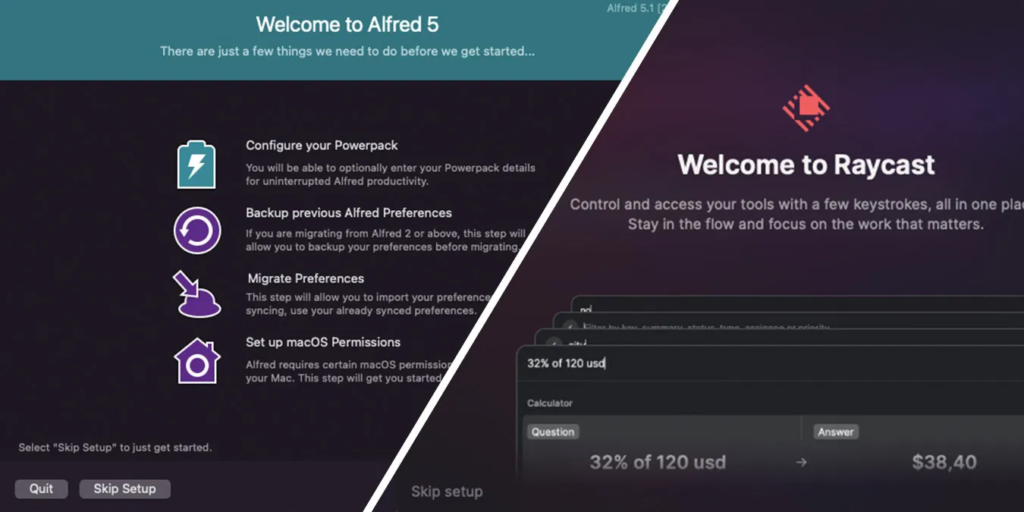
An advanced application launcher and productivity tool for macOS. It replaces or enhances Spotlight with faster search, hotkeys, workflows, snippets, file actions, and more. It’s been around since 2010 and has a huge ecosystem of user-created “workflows.”
Raycast
A newer launcher app (from 2020) that also acts as a command palette for your Mac (and now beta for Windows). It combines launching apps/files with built-in tools like clipboard history, window management, extensions, AI tools, and app integrations.
📊 Pricing & Licensing
| Feature | Alfred | Raycast |
|---|---|---|
| Base Version | Free | Free |
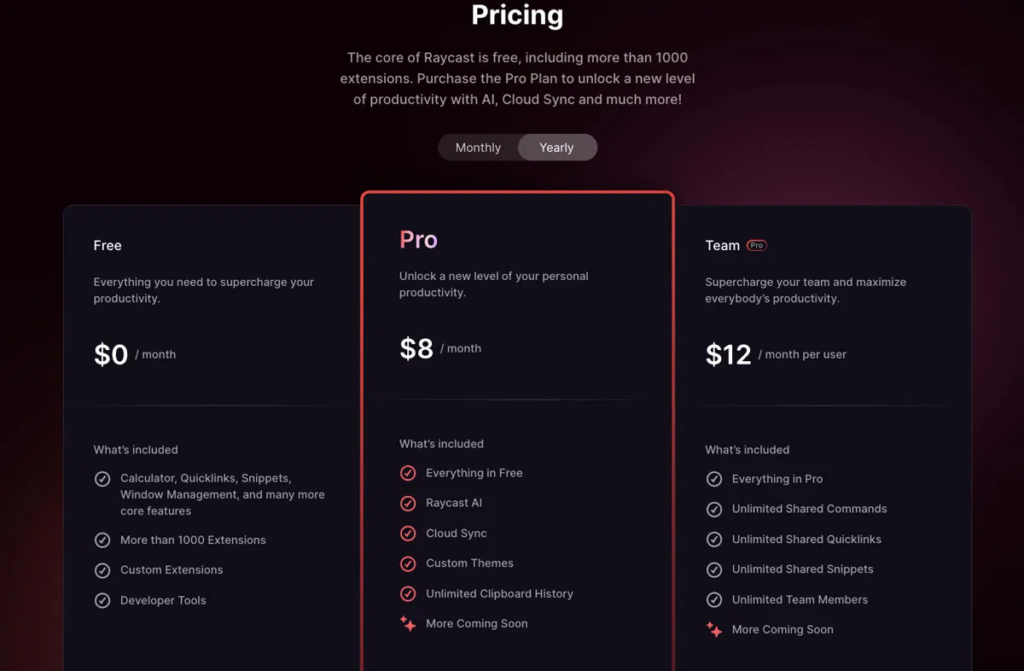
| Unlock Advanced | Powerpack one-time | Pro subscription monthly/annual |
| AI Features | Community workflows (API) | Built-in chat + Quick AI (Pro) |
| Sync & Cloud | Manual or third-party | Built-in (Pro) |
- Alfred: Most basic search/launcher is free; advanced automation & features require one-time Powerpack purchase.
- Raycast: Powerful free tier with most features; Pro subscription adds AI, cloud sync, theming, and team features.
💡 Alfred’s pricing feels friendlier if you dislike subscriptions, but Raycast offers more out of the box for free.
🚀 Core Features
🔎 App & File Launching
Both excel at fast app and file search. Alfred often feels slightly faster with fewer keystrokes, while Raycast’s interface is more modern and visually intuitive.
📋 Clipboard & Snippet Management
- Raycast: Built-in clipboard history and snippet expansion free.
- Alfred: Clipboard & snippets available only with Powerpack.
⌨️ Window & System Management
- Raycast: Built-in window snapping, system controls, emoji picker, notes, and more.
- Alfred: Can do similar via workflows but not native.
💡 Calculator & Utilities
- Raycast: Better natural-language calculations, unit conversions, date math.
- Alfred: Basic calculator, advanced requires workflows.
🧠 AI Integration
- Raycast Pro: Native AI chat/assist with models like ChatGPT/Claude inside launcher.
- Alfred: AI must be integrated through custom workflows with API keys.
🛠️ Extensibility: Workflows vs Extensions
Alfred Workflows
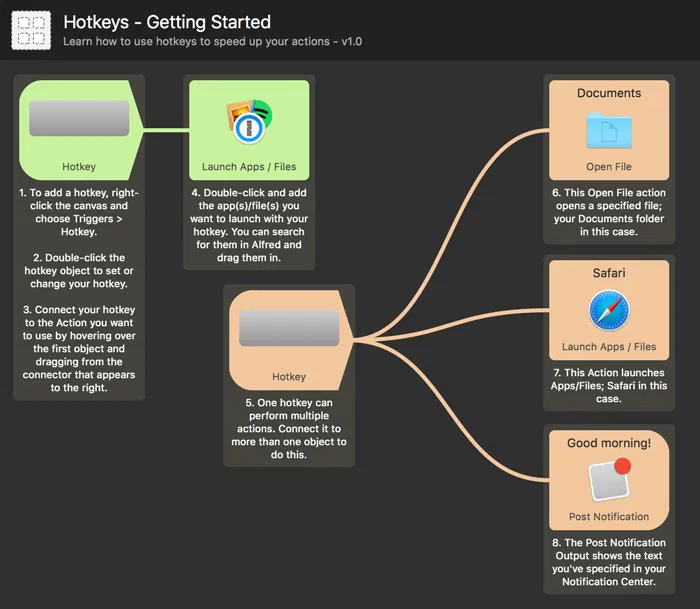
- Highly customizable: Drag-and-drop workflow editor plus scripting (Bash, AppleScript, Python, etc.).
- Great for deep automation and power users.
- Workflows can perform complex tasks (text processing, system actions, app controls).
- But workflows can be harder to find/install/manage and sometimes unstable.
Raycast Extensions
- Uses a curated extension store, often installable with one click.
- Extensions are like mini-apps (search, actions, integrations).
- Generally easier to discover/manage and more visually consistent.
- Built with JavaScript/TypeScript for developers comfortable with code.
Summary
- Alfred: deeper automation power if you’re willing to build & customize.
- Raycast: more approachable extension ecosystem with quality review & easier setup.
🧠 UX & Design
Raycast: Modern UI, smooth animations, consistent look, feels native to macOS.
Alfred: Functional and lightweight, customizable themes, but feels older and more “classic techie.”
Users often note Raycast’s UI makes tasks feel more integrated, while Alfred’s simplicity can feel snappier and less resource-heavy.
⚙️ Pros & Cons
Alfred
Raycast
🧠 Which Should You Choose?
👉 Choose Raycast if:
- You want a modern, polished launcher that’s powerful out of the box.
- You plan to use clipboard history, window management, calculator, and utilities without paying.
- You want easy access to integrations (GitHub, Jira, Notion, etc.).
- You’re okay with a subscription for AI and cloud sync.
👉 Choose Alfred if:
- You’re a power user who loves deep automation and customizing workflows.
- You prefer a one-time purchase over a subscription.
- You want extremely fast file search and powerful snippet tools.
- You already use Alfred workflows and don’t want to rebuild your setup.
🧪 Tips for Trying
✅ Try both: they’re free at entry level.
✅ Start with your basic tasks (launching apps/files, clipboard history) and see which feels faster.
✅ Test a few workflows/extensions you need (e.g., search, snippet expansion, window management).
🧾 Quick Verdict
💥 Raycast — Best for most modern users who want a powerful, all-in-one launcher with minimal tinkering.
🧠 Alfred — Best for those who demand automation depth and scriptability with a one-time purchase.
READ ALSO: Why Online Safety Is Important?
FAQs
Can they replace Spotlight (the Mac’s built-in search)?
✔️ Yes — both offer faster, more powerful search and actions than Spotlight; Raycast especially positions itself as a richer alternative.
❓ Which platforms do they support?
Alfred: macOS only.
Raycast: macOS and now Windows (public beta).
What’s a “workflow” vs an “extension”?
Alfred “Workflows” let you automate tasks — from simple shortcuts to complex chains of scripts.
Raycast “Extensions” are pre-built plug-ins that add integrated tools (e.g., GitHub search, Jira, calendar views) without as much custom scripting.
Which is easier to use?
Raycast feels modern and intuitive right away, with built-in tools and curated extensions.
Alfred has a steeper learning curve but is extremely efficient once configured.
Do these tools manage clipboard history or text snippets?
Raycast: Clipboard history and snippet expansion are built in (free tier).
Alfred: Clipboard and snippets are available with Powerpack.
Can I manage windows and system actions?
Raycast includes native window management, system actions, and utilities (calculator, converters) without add-ons.
Alfred can do similar with workflows but requires setup.

Hi, this is Masab, the Founder of PC Building Lab. I’m a PC enthusiast who loves to share the prior knowledge and experience that I have with computers. Well, troubleshooting computers is in my DNA, what else I could say….